Simple keypad
a six digit keypad example
Simple keypad lock example
Here is a quick example on how to make a keypad with 6 digits.
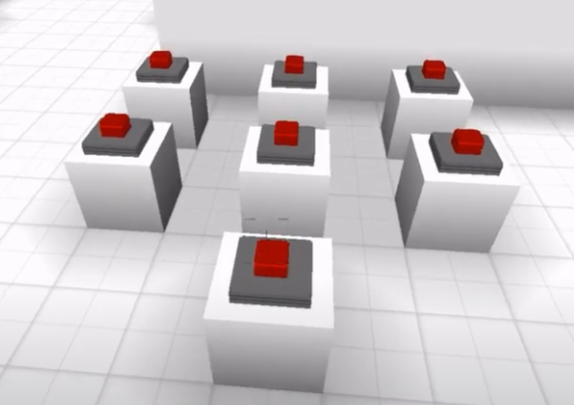
Process
- Place 6 buttons in a grid and set their id as "b1","b2",...
- Place one more button at the bottom, this will act as a "Enter/Clear" button.
- Copy/paste the code below into the Enter button.
var correct = [6,5,2,6] // your code

let txt = parcel.getFeatureById('correcttxt') //Sign that displays the result

/* ---------------- */

var code = [0,0,0,0]

let b1 =parcel.getFeatureById('b1')
let b2 =parcel.getFeatureById('b2')
let b3 =parcel.getFeatureById('b3')
let b4 =parcel.getFeatureById('b4')
let b5 =parcel.getFeatureById('b5')
let b6 =parcel.getFeatureById('b6')


function hasStarted(element){
  return element==0
}

b1.on('click', e=>{
  console.log('1')
  position = code.findIndex(hasStarted)
  code[position]=1

})

b2.on('click', e=>{

  position = code.findIndex(hasStarted)
  code[position]=2

})

b3.on('click', e=>{

  position = code.findIndex(hasStarted)
  code[position]=3

})

b4.on('click', e=>{

  position = code.findIndex(hasStarted)
  code[position]=4

})

b5.on('click', e=>{

  position = code.findIndex(hasStarted)
  code[position]=5

})

b6.on('click', e=>{

  position = code.findIndex(hasStarted)
  code[position]=6

})

function arraysEqual(arr1,arr2){
  i=arr1.length
  for(i;i--;){
    if(arr1[i] != arr2[i]){
      return false;
    }
  }
  return true;
}

function reset(){
  code=[0,0,0,0]
}

feature.on('click', e=>{
  if(arraysEqual(correct,code)){
    txt.set({'text':"good"})
  }else{
    txt.set({'text':"bad"})
    reset()
  }

})
How the code works is as follows: Player enters 4 numbers and then press Enter; If the combination is wrong, the sign txt will display "Bad", else it will display "Good".